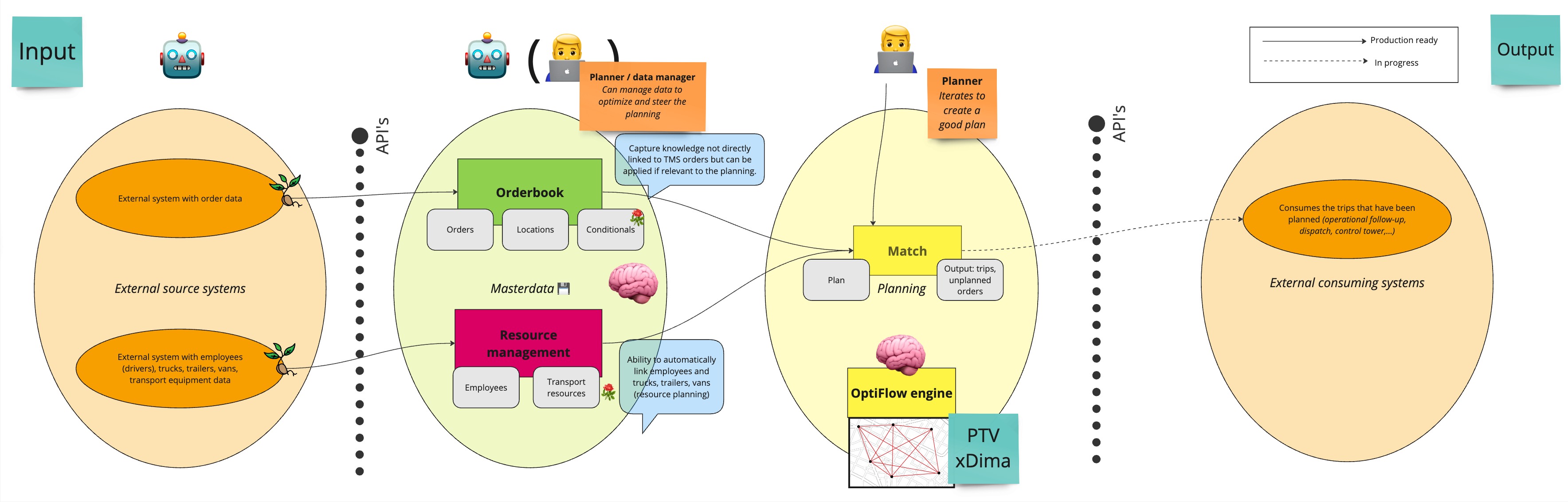
As we are introducing more APIs and components within our platform, we pay attention to having each part of the platform to play nicely with existing parts. This table contains relations and specifies if they are compatible or not.
| Usage together in one planning | Orderbook API | Vehicle API | Planning API | Plan Profiles [BETA] | Resource planner [BETA] |
|---|---|---|---|---|---|
| Order XLSX | Not supported | Not supported | Supported | Supported | Not supported |
| Vehicle XLSX | Supported | Not supported | Supported | Supported | Not supported |
| Planning export XLSX | Supported | Supported | Supported | Supported | Supported |
Most APIs that you will find documented here are stable. They can be integrated without any additional concern. We expand the API in such a way that it is non-breaking for existing integrations both on a data structure level as well as on behavior level.
If you are building a stable future-proof integration, this is the main area you should focus on, avoiding the next two tags.
Sometimes APIs are marked with the tag [Experimental]. This means the API is part of an active area of development on our side. We strongly believe in fast and early feedback, so whenever development is ongoing for something new, we try to involve customers. This API is not stable; we learn and adapt before we make the API stable. If you want to start using an experimental API, it is advised to contact your customer success representative so that we can set up a meeting to discuss what you want to achieve first to avoid rework. These APIs have no stability guarantee until the tag is removed.
APIs marked as deprecated will no longer be supported in a future major API release. It is recommended to start using alternative functions within the API to achieve the same functional result. Documentation for a deprecated property should indicate what the replacement is and potentially even link to a more detailed API document page.
PTV Optiflow optimization has 3 major aspects for optimization:
- cost steering
- hard constraints
- soft constraints
Some of our APIs have cost properties that are taken into account as KPIs while optimizing.
Hard constraints are called requirements in the API. They consist of tags and forbidden_tags.
A tag is something that will always need to be matched on a vehicle.
Example: A delivery of ice cream would have a requirement containing frozengoods so it can be matched with a transport resource providing this frozengoods capability. If that capability cannot be provided, the order will remain unplanned.
Forbidden tags work in the opposite way. An order will never be placed on a resource combination (vehicle) that has that capability.
There is no way to deviate from requirements - they are strictly enforced.
Soft constraints are configured separately from the order and the transport resource. They are based on labels and can be configured to either reward or punish relationships with a cost.
For example, for region steering:
- If you have a driver that prefers to only drive in Antwerp, the employee should have the label
prefers-antwerp - The order should have a label
antwerp-region - You can then set up an
order-vehicle constraintthat penalizes all planned orders that don't match anantwerp-regionorder with aprefers-antwerpresource combination
- These rules can be managed separately or even chosen not to be used
- They will not prevent orders from getting planned
- They will just increase the cost of your planning if they cannot be satisfied
- This ensures that the preferred behavior is the most likely outcome in a cost-based optimization
Currently, the integration process for constraints works as follows:
- Input data needs to specify the
requirementsandlabelsto configure constraints inside the platform - This means you only need to set up the data in your integration
- Configuring the actual constraints happens in a separate screen within plan-profiles
- There is currently no API available to configure these constraints programmatically
- Constraints are quite OptiFlow-specific
- They are often not available in source systems for integration
On most entities within our API, there is the ability to add custom data in a map. This provides several benefits:
- Contains information in a semi-structured way (key-value pairs)
- Is transmitted in our platform from input to output APIs
- Helps integrations that consume routes in separate systems from the input
- Is available to the planning engine during planning
Custom data can aid planning decisions with additional information or context such as:
- Filtering options
- Making planboard edits
- Passing through business-specific information
For optimal planning results:
- Requirements: Use for rules that should never be broken
- Labels: Add as meta-data to hook into later when configuring soft constraints
- Costs: Set appropriate costs so your planning can be optimized to be more cost-effective
In the future examples of functional cases and their required API interactions will be posted here.